scMarkerGene Tutorial
Welcome to the scMarkerGene tutorial! This guide walks you through the key functionalities of the pipeline, from installation to data preparation and quick execution.
🧠 scMarkerGene Workflow
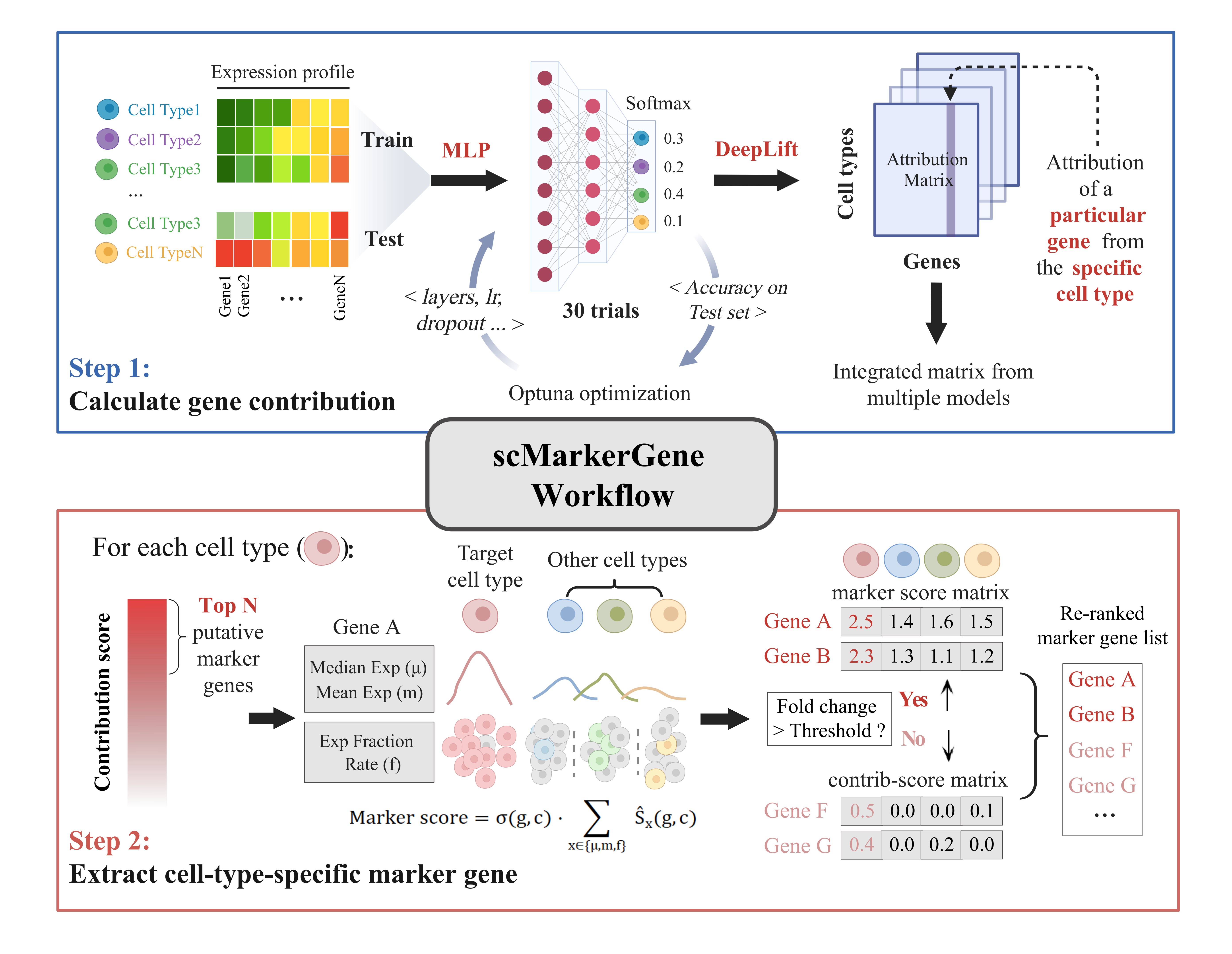
In Step 1, the input scRNA-seq expression matrix is randomly split into training and validation sets (9:1) and used to train an MLP classifier supervised by cell type annotations. The training process is guided by validation accuracy, with hyperparameters iteratively optimized using Optuna. Once the optimal hyperparameter set is determined, ensemble learning is further applied to generate a more robust attribution score matrix. In Step 2, the top N genes (user-defined) with the highest contribution scores are selected as candidate marker sets for each cell type. These gene lists are then re-ranked by computing a marker score, yielding the final marker lists.
🛠️ Installation
Make sure Mamba is installed on your Linux system.
Then, run the following commands:
mamba create -n scMarkerGene python=3.10
mamba activate scMarkerGene
mamba install pandas captum optuna scikit-learn
📥 Input Preparation
Your input single-cell RNA-seq expression matrix must be provided as a tab-delimited text file (.txt) with the following format:
- File must be in cell × gene wide format (rows = cells, columns = genes).
- The first two columns must be:
cell_id: unique identifier for each cell (e.g.,cell_001,cell_002, …)group: known label, annotation, or cell type of each cell- All remaining columns correspond to gene expression values, with column names as gene symbols.
These values can be either: - Raw counts
- Normalized expression
⚠️ Important:
File should be tab (\t) separated, not comma separated.␣␣
Missing values should be filled with 0.
Example:
| cell_id | group | GeneA | GeneB | GeneC |
|---|---|---|---|---|
| cell_001 | cell_type1 | 0.12 | 0.03 | 1.22 |
| cell_002 | cell_type2 | 0.45 | 0.00 | 0.98 |
📂 Demo Data
The demo dataset is provided as raw counts, where each value represents the original sequencing count per gene per cell.
You can download a demo dataset in the correct format from:
👉 Demo Data
🚀 Quick Start
After downloading and extracting the Source code package, navigate to the folder containing the four Python files:
cd path/to/scMarkerGene
Run the automation script to start the full marker gene analysis:
python 000_makeAutoRunScript.py -i <input_file> -w <workdir> -t <count|normalized> --strategy <upsample|weights|none>
| Argument | Requirement | Default | Description |
|---|---|---|---|
-i INFILE |
required | – | Path to the input expression matrix (must follow the Input Preparation format). |
-w WORKDIR |
required | – | Absolute path to the working directory for output files. Must exist and be writable. |
-t {count, normalized} |
optional | count | Input data type: count = raw counts, normalized = log-normalized / CPM / TPM. |
--strategy |
optional | upsample | Strategy for handling class imbalance: Options: upsample = simple oversampling, weights = class-weighted los), none = no balancing. |
After running the above command, an autorun.sh script will be generated in <workdir> path.
You can then automatically execute the entire pipeline by running:
bash <workdir>/autorun.sh
This will run all analysis steps and generate the output file in <workdir>.
Note: Expression values can be either raw counts or normalized values.
Use-t normalizedif your data has already been log-transformed or scaled.
We recommend adding--strategyupsampleorweights` to mitigate class imbalance — though this may increase runtime.
📥 Source Code
The source code includes four Python files:
- 000_makeAutoRunScript.py
- 001_prepareData.py
- 002_geneContribution.py
- 003_extractCellMarker.py
The 000_makeAutoRunScript.py will automatically run 001_prepareData.py, 002_geneContribution.py and 003_extractCellMarker.py in sequence, and generate the final output files in <workdir>.
📄 Detailed descriptions of the main marker extraction Python file:
- 001_prepareData
- 002_geneContribution
- 003_extractCellMarker
You can download the complete source code package here:
👉 Source code file
📑 Output File
The main result is a marker gene table named: scMarkerGene_Top20_marker_exp.txt
It is saved in the output folder of the marker extraction step:
<workdir>/003_extractCellMarker_output/scMarkerGene_Top20_marker_exp.txt
This txt file contains the top 20 ranked marker genes per cell type.
Columns:
- marker → gene name of the marker
- target_cell_type → the cell type where the gene is identified as a marker
- fold_level → the expression fold-change of the gene in the target cell type relative to other cell types
- marker_score → composite score (silhouette × specificity) indicating the gene’s discriminative power
Example (partial):
| marker | target_cell_type | fold_level | marker_score |
|---|---|---|---|
| Gene1 | cell_type1 | 2.0 | 2.5 |
| Gene2 | cell_type1 | 2.0 | 2.3 |
| Gene3 | cell_type1 | 1.9 | 2.1 |
| ... | ... | ... | ... |
📌By default:
For each cell type, the top 20 marker genes are listed (ranked from highest to lowest marker score).
The values in the expression matrix (from column 3 onwards) represent the median expression of each marker gene across different cell types.
For example, in the cell_type1, the highest-scoring marker is Gene1.